Copy the link to a markdown format of this article for ChatGPT, Claude, Gemini, or your favorite AI.
Google’s research shows that 53% of mobile users leave a page that takes longer than three seconds to load, highlighting the critical nature of optimal server response times. For WordPress site owners, server response time can be one of the key culprits behind sluggish performance.
The starting point of all server-side diagnostics is the Time-to-First-Byte (TTFB). TTFB is the amount of time it takes for a user’s browser to receive the first byte of page content from your server after a request is made. It measures the responsiveness of your web server. A lower TTFB indicates a more responsive server, which means quicker loading times for users. This metric is particularly crucial for WordPress websites, where themes, plugins, and database queries can impact response times.
In this article, we’ll explore practical strategies to enhance your WordPress server’s performance, ensuring your site loads swiftly and stands out in the competitive online market.
Tools to Determine Your Website’s TTFB
There are several tools you can use to accurately measure your site’s Time-to-First-Byte (TTFB). These tools provide a comprehensive analysis of your site’s speed, offering metrics, suggestions, and visualizations to help you optimize your site’s performance.
Google’s PageSpeed Insights
Google’s PageSpeed Insights is a popular and user-friendly tool that analyzes your website’s performance and provides a clear, concise report with actionable recommendations. It measures your TTFB and provides separate performance scores for mobile and desktop devices, giving you a comprehensive overview of your site’s speed across different platforms.
One of the key strengths of PageSpeed Insights is its ability to provide specific, prioritized suggestions for improving your site’s performance. The tool highlights opportunities for optimization, such as compressing images, minifying CSS and JavaScript, and leveraging browser caching. It also offers diagnostic insights, identifying issues like render-blocking resources and unoptimized images that may be slowing down your site.
Example Core Web Vitals Assessment results from Google’s PageSpeed Insights.
WebPageTest
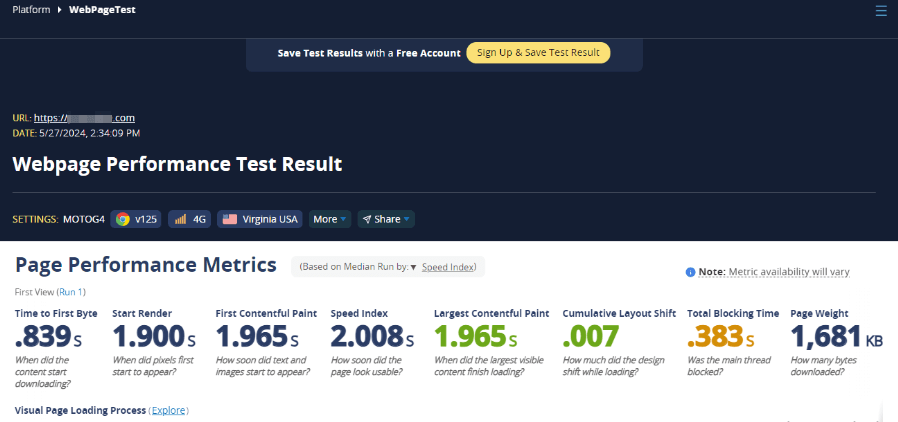
WebPageTest is a powerful, versatile tool that offers a wealth of features and customization options for measuring your site’s TTFB and analyzing its performance. One of its key advantages is the ability to test your site from multiple locations worldwide, using different browsers and connection speeds. This feature is particularly valuable for understanding how your site performs for users in different regions and under various conditions.
In addition to measuring TTFB, WebPageTest provides a detailed waterfall chart that visualizes your site’s loading process, showing the order in which resources are loaded and the time taken for each resource. This can be incredibly helpful for identifying performance bottlenecks and optimizing your site’s loading sequence.
WebPageTest also offers a performance grade that scores your site on key metrics like TTFB, compression, and caching. This grade provides a quick, high-level assessment of your site’s performance and can be a useful benchmark for tracking improvements over time.
Example performance report from WebPageTest.
Browser’s Developer Tools
Built-in browser developer tools, such as those found in Chrome, Firefox, and Edge, are invaluable for measuring TTFB and analyzing your site’s performance in real-time. These tools provide detailed, real-time insights into your site’s loading process, making them ideal for quick checks and on-the-fly optimizations.
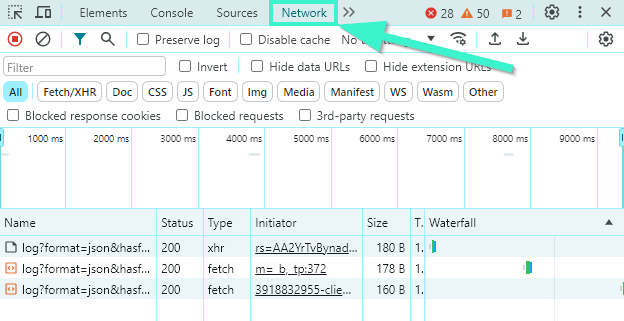
Such tools can be accessed by pressing F12 or right-clicking on a webpage and selecting Inspect. Within these tools, the Network tab will show you the TTFB for each element on the page as it loads.
One of the key advantages of using browser developer tools is the ability to see how your site performs under real-world conditions, using your own device and network connection. This can help you identify performance issues that may not be apparent when testing with other tools that simulate different devices and networks.
Browser developer tools also allow you to drill down into specific resources, such as images, scripts, and stylesheets, to see how they impact your site’s loading time. This granular level of detail can be incredibly valuable for identifying and optimizing resource-intensive elements that may be slowing down your site.
The Network tab in the browser’s Inspector tool.
What Causes Slow Response Time?
There are several factors that can lead to slow server response times. For example, network bandwidth plays a pivotal role in data transfer rates and, consequently, in TTFB. When bandwidth is limited, it can significantly throttle the speed at which data is sent from the server to the user’s browser, resulting in longer loading times.
Optimizing the size of your assets – such as images, videos, and scripts – can reduce the strain on bandwidth. Compressing files, using modern image formats like WebP, and implementing efficient loading techniques such as lazy loading can help minimize the data load and improve response times.
Slow queries are another potential source of concern. Each time a user accesses your site, WordPress fetches data from the database. If these queries aren’t optimized, it can delay the response significantly. To improve this, regularly optimize your database by cleaning up old data, reducing overhead, and using indexes effectively. WordPress-specific plugins like WP-Optimize can automate many aspects of database maintenance, ensuring your queries run as efficiently as possible.
Caching, or storing a copy of the site closer to the web browser to reduce requests to the server, is a technique that should enhance the performance of your WordPress site. However, missing or poorly configured caching strategies can lead to unnecessarily high TTFB, as the server will process each request from scratch.
Implementing a robust caching strategy using plugins like W3 Total Cache or WP Rocket can help mitigate this issue by storing static versions of pages that don’t need to be dynamically generated upon every visit.
Another potential issue that may be causing your server to respond slowly is web page bloat. This refers to pages packed with unnecessary assets, which can significantly impede server response times. To combat this, adopt a minimalistic design approach by only using essential elements and compressing assets. Tools like WordPress’s native features or plugins that minify CSS and JavaScript files can also help reduce page size, ensuring a quicker load time and better server response.
The quality of your hosting solution is fundamentally linked to your site’s performance. Subpar hosting can lead to increased TTFB and overall sluggishness, as cheaper or shared hosting plans often lack the resources needed to handle high-traffic or data-intensive applications effectively. WordPress-specific hosts are often the best solution since they’ve been built specifically to meet the needs of WordPress websites.
8 Ways to Improve Server Response Time
There are several steps you can take to improve your server response time and get your WordPress site running smoothly again.
1. Check Your Caching
As we mentioned before, caching reduces server response times by storing copies of files so they can be served faster to your users.
It’s worth noting that there are several types of caching:
Page Caching: Stores fully rendered HTML pages on the server, reducing the need to run PHP scripts and database queries for each page load.
Object Caching: Saves database query results so that the next time a piece of data is needed, it is served from the cache rather than being recalculated.
Database Caching: Reduces the time to fetch data from the database by storing the results of queries for later use.
BrowserCaching: Allows static files (like CSS, JavaScript, and images) to be stored in the user’s browser. The next time they visit your site, these files load from the cache rather than being downloaded again.
While these caching methods can dramatically improve your site’s response time, improper setup can lead to issues and even slow down your site. To ensure your website is caching correctly, using a tool like the Gift of Speed Browser Caching Checker can provide a quick assessment of whether your static content is being effectively cached in users’ browsers.
If your website isn’t properly cached, the next step is to check your website settings. Pressable users, for example, can log into their MyPressable dashboard, select the website in question, and verify if it’s configured with the Edge Cache.
For WordPress users whose hosting providers do not manage caching, or if the existing caching strategies fall short, a caching plugin may be the solution. Check out our guide on effective and reliable website caching to learn more about your best caching solutions.
2. Optimize Your WordPress Database
A clean and well-organized database is foundational to maintaining optimal performance on your WordPress site. Over time, databases can become cluttered with unnecessary data, which can slow down your website by increasing the time it takes to query information.
Three areas where clutter can become problematic in WordPress include:
Post Revisions: WordPress saves every change you make in the posts as revisions. Over time, these can accumulate and bloat your database, slowing down your website.
Transients: These include temporary data stored in your database, used to store cached data temporarily. If not managed properly, transients can expire and remain in your database, taking up space.
Orphaned Metadata: This occurs when metadata associated with deleted posts remains in your database. Like transients, this unused data can accumulate and degrade performance.
These plugins automate the majority of the cleanup process, reducing the manual workload and
helping maintain your database efficiency without direct intervention.
3. Update Your PHP Version
Each new version of PHP, the scripting language that powers WordPress, typically offers improved speed and security. Running older versions of PHP can significantly impact your site’s performance and security, and an upgrade can make a big difference. For instance, upgrading from PHP 7.2 to PHP 7.4 can help you see noticeable improvements in processing times due to optimizations and new features in the language.
Make sure to approach updating PHP with caution. Always back up your WordPress site before updating PHP. This ensures you can restore your site to its original state if anything goes wrong.
For Pressable users, you can update the PHP version directly from the MyPressable dashboard. Here’s how to quickly update PHP:
Log in to your MyPressable control panel.
Select the site you want to manage.
Go to Settings and find the PHP Version section.
Choose the latest PHP version from the dropdown menu and confirm your selection.
4. Compress Website Images
Images often constitute a significant portion of your website’s total data load. High-quality images can dramatically enhance your site’s aesthetic but can also be data-heavy, slowing down page load times. Compressing these images is essential to maintaining both speed and visual quality.
Several elements influence the size of an image:
File Type: Different formats like JPEG, PNG, and GIF have varying compression capabilities and use cases. JPEGs are typically best for photographs due to their efficient compression, PNGs are good for images requiring transparency, and GIFs are ideal for simple animations. WebP has gained popularity as it supports lossy and lossless compression.
Level of Detail: More detailed pictures result in larger file sizes.
Physical Size: The dimensions of the image in pixels can dramatically affect the file size.
Pixel Density: Higher pixel density can lead to better quality at the cost of increased file size.
It’s important to compress images in a way that reduces file size without degrading visual quality. For those unfamiliar with manual image optimization techniques, using an image compression plugin can simplify the process.
Here are a few popular options for optimizing images in WordPress:
Optimole: Optimole optimizes images in real-time using a cloud-based system, which ensures your images are served at the smallest possible size without losing quality.
Imagify:Imagify offers different levels of compression and can convert images to WebP format for better performance while maintaining image quality.
ShortPixel:ShortPixel provides both lossy and lossless image compression, automatic resizing, and PDF files.
The principle of compression should extend to all forms of media on your site, including videos, documents, and other files. Large video files, for instance, should be compressed or hosted on external platforms like VideoPress, YouTube, or Vimeo to avoid overloading your server.
5. Run an Inventory of Queries to Your Site
Each time a page loads, WordPress runs queries to retrieve content from the database. Problems arise when these queries are not optimized or the database lacks a proper organizational schema. This can lead to longer loading times as the server struggles to locate and retrieve the necessary information.
One common issue is that over time, as content and user data accumulate, queries that once ran efficiently may start to slow down due to increased database load. Additionally, poorly designed or legacy plugins can introduce inefficient queries that degrade performance.
The Query Monitor plugin can be useful for effectively diagnosing and resolving these issues. It allows you to view an ongoing log of all queries processed on your site, along with information about which queries are slow and their impact on page load times. It also includes a built-in warning and notice system, which makes it easier to identify and troubleshoot specific issues directly related to query performance.
6. Update Installed Software
Keeping your WordPress core, themes, and plugins updated is essential for ensuring security and optimal performance. Software updates often contain improvements that enhance performance, fix bugs, and close security vulnerabilities. Outdated themes, plugins, or WordPress core can lead to slow performance and expose your site to security risks. Therefore, regular updates are crucial for maintaining the health and speed of your site.
To update WordPress safely, follow these steps:
Back up your site.
Before applying updates on your live site, test them in a staging environment. This allows you to check for any compatibility issues without affecting your live site.
Once tested, perform the updates on your live site.
If your hosting service includes managed updates, like Pressable offers, they will often handle this process for you, ensuring your site is always running on the latest stable releases.
7. Block Unwanted Bots
Bots are automated programs that perform tasks over the internet. While some bots, like Googlebot, are essential for your site’s visibility in search results, others can be harmful. Unwanted bots can lead to increased server load, slower response times, and even security risks if they are designed to exploit vulnerabilities.
Unwanted bots can significantly slow down your website by consuming server resources that are better allocated to real users. These bots can range from harmless crawlers that index your site for search engines to malicious bots that scrape content, attempt to break passwords, or look for vulnerabilities to exploit.
Before you can block unwanted bots, you need to identify them. Here are a few signs that your site might be dealing with unwanted bot traffic:
Lack of Engagement: Unusually high traffic not correlating with human behavior or actual user engagement.
Peak Traffic Outside Normal Hours: Spikes in traffic at odd hours, especially from similar IP ranges or geographic locations that do not align with your target audience.
HIghtened Resource Use: Increased server resource usage without corresponding increases in legitimate user metrics (like conversions).
Once you identify unwanted bot traffic, here are some techniques to block them:
Robots.txt: This is a file on your server that tells well-behaved bots which parts of your site they should not access. While not all bots respect this file, it is vital for controlling the behavior of good bots and reducing unnecessary load.
Web Application Firewall (WAF): A WAF can help you filter out malicious traffic before it reaches your server. Services like Cloudflare and Sucuri offer options that automatically block known bad bots and provide an interface to configure custom rules based on your needs.
CAPTCHAs: Implementing CAPTCHAs can help differentiate between human users and bots. They are useful on login pages, comment sections, and anywhere bots might try to submit data.
Rate Limiting: Setting up rate limiting can prevent bots from making too many requests in a short period. This is particularly useful against brute force attacks and can be configured via your hosting provider or a plugin.
Analyzing Access Logs: Regularly reviewing your server’s access logs can help you identify suspicious patterns that indicate bot activity. Once identified, you can block these IPs directly through your .htaccess file or via your hosting dashboard.
8. Switch to a More Powerful Host
As your WordPress site grows in traffic and complexity, your hosting needs will evolve. A common reason for slow server response times is hosting that no longer meets your site’s demands. Upgrading your hosting solution can be a necessary step in maintaining and enhancing site performance.
The type of hosting you choose has a significant impact on your website’s performance, especially when it comes to server response times:
Shared Hosting: This is the most cost-effective option, where multiple sites share the same server resources. While economical, shared hosting can lead to slower response times during peak traffic periods as resources are distributed among many users.
Virtual Private Server (VPS) Hosting: This offers more control and dedicated portions of server resources compared to shared hosting. A VPN is a middle ground between shared hosting and having a dedicated server, providing better performance without the cost of a dedicated server.
Dedicated Hosting: This involves leasing an entire server for your website. Dedicated hosting offers maximum control and performance but at a higher price point and typically requires more technical management.
Managed WordPress Hosting: This is tailored specifically for WordPress websites and includes performance tuning, expert WordPress support, and enhanced security. Managed hosting providers take care of backend concerns, so you can focus on growing your site. Learn more about comparing and selecting a managed hosting provider for WordPress.
Managed WordPress hosting is particularly beneficial for users who want to optimize their site without diving deeply into technical details. Key benefits include:
Performance Tuning: Managed WordPress hosts optimize their servers specifically for WordPress, ensuring that your site runs efficiently and swiftly.
Expert Support: These hosts provide support teams that specialize in WordPress, offering knowledgeable assistance that can be vital for troubleshooting and advice.
Scalability: Managed hosting solutions easily accommodate traffic spikes and site growth without you having to allocate resources manually.
Experience the difference a professional, managed WordPress hosting provider can make for your website and business. Give Pressable a try to see the results.
Server response time is important to your website’s overall performance, impacting everything from user experience to SEO rankings and website conversions. If your WordPress site is slow to load, it can lead to high bounce rates, poor user satisfaction, and, ultimately, affect your bottom line.
Throughout this article, we’ve explored essential strategies to enhance server response times, from optimizing your WordPress database and compressing images to ensuring your caching is correctly configured. Each step contributes to making your site as efficient and fast as possible.
Pressable is an ideal option for those seeking managed WordPress hosting. Our servers, powered by WP Cloud, are configured specifically for WordPress, so your site performs optimally under any load. But the biggest benefit we offer our clients is support and expertise. Our team of experts know WordPress hosting and we’re eager to help you and your business grow.
Zach brings a wealth of knowledge to Pressable with more than 15 years of experience in the WordPress world. His journey in WordPress began with creating and maintaining client websites, fostering a deep understanding of the intricacies and challenges of WordPress. Later, his knack for problem-solving and commitment to service led him to pursue a role at Automattic, where he excelled in providing customer support for WooCommerce. His expertise extends beyond technical proficiency to encompass a deep understanding of the WordPress community and its needs.
Outside of work, Zach enjoys spending time with his family, playing and watching sports, and working on projects around the house.
Think about it: when you enter a website, and it loads faster than you can say “cache,” doesn’t it feel like a breath of fresh air? That’s because the faster your site loads, the happier […]
In today’s fast-paced world, it’s not enough for your business to simply have an online presence. You need to make sure your website is fast, and it is quick to respond to visitor interactions. One […]
If you’ve ever been faced with the ERR_CONNECTION_TIMED_OUT error in WordPress, you know how frustrating it can be. While it’s a common issue, its complexity can leave website owners feeling overwhelmed. Understanding this error allows […]