

In our effort to continually raise the bar with regard to your site’s performance and security, we’re thrilled to share that we’ve added a new feature that will protect your site if it ever comes under a DDoS attack.
While Pressable’s platform provides DDoS protection, Edge Cache’s Defensive mode offers an additional on-demand layer of protection.
Utilizing proof-of-work, Defensive Mode issues a challenge to browsers visiting the site, mitigating spam bot and DDoS attack requests. Legitimate users will briefly see a challenge page while their browser completes the work before accessing the site.
You can now activate Defensive Mode within your MyPressable control panel in just a few clicks. This feature can be enabled for durations ranging from 30 minutes to 7 days.
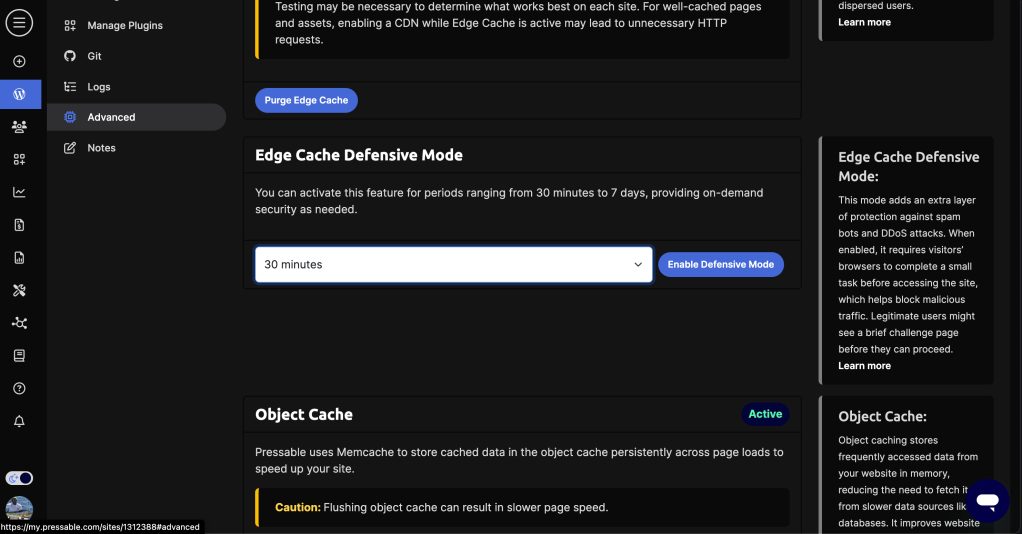

Once it’s activated, you can let it run for the period you select, or you can deactivate Defensive Mode before the automatic deactivation time.

While we hope you never have a need for this, we also hope it provides peace of mind to know you have an extra layer of protection for your mission-critical sites.
Bulk Manage Edge Cache Defensive Mode
Using Bulk Operations, you can enable Edge Cache Defensive Mode across multiple sites in a single action. Select Edge Cache Defensive Mode as the operation, choose the sites you want to apply it to, and specify how long it should remain active. You can enable Defensive Mode for anywhere between 30 minutes and 24 hours.
If you need to end Defensive Mode before the scheduled duration expires, select Disable Defensive Mode to return the selected sites to normal caching immediately. Otherwise, Defensive Mode is automatically disabled when the selected duration ends, and no further action is required.
Each site is processed independently, so if one or more sites are ineligible, the remaining sites in the batch will continue processing normally.
Thanks for choosing Pressable!