Copy the link to a markdown format of this article for ChatGPT, Claude, Gemini, or your favorite AI.
Searching half a dozen stock image libraries for the perfect photo frustrates many web designers. The new Openverse project from WordPress aims to make finding royalty-free images simple and fast.
Use this post as your guide to the Openverse. We’ll cover what it is, how to use it, and why it could make your job easier and your website better.
What is Openverse?
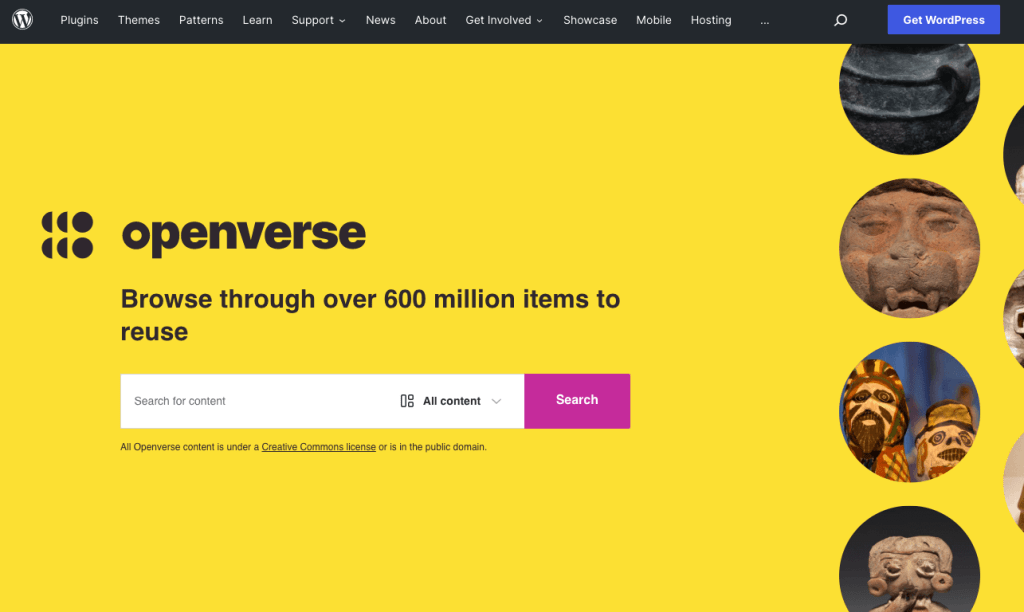
Openverse is a WordPress search engine for open source media. You can use Openverse to find images and audio files available under a creative commons license.
Originally known as CC Search, this powerful search engine got its start as a part of Creative Commons. When CC Search became a part of WordPress in 2021, it was rebranded as Openverse.
Openverse aims to provide an open-source and royalty-free alternative to paid image libraries. Anyone can use this free service to find and use more than 600 million image and audio files.
How to Use Openverse to Find Audio or Visual Content
Using Openverse is simple and straightforward. Just go to the homepage at wordpress.org/openverse/ and type a search team in the box. You can filter your search depending on whether you’re looking for audio or image content.
You can then view the results and select relevant files to download.
Openverse is a search engine, not a photo repository. The key difference is that it does not host the files – it directs you to where you can find the file yourself. You’ll still need to upload it to your media library.
Once uploaded, consider converting the image to the newer WebP format for the best site performance.
How Openverse Helps Make Better Websites
Openverse is a welcome addition to the WordPress family. The project can make building eye-catching websites easier and faster than ever before.
Benefits of using Openverse include:
Faster Design and Development. Openverse eliminates the need to search multiple photo libraries to find the right image. You can design and build sites in less time.
Better Looking Websites. Quality images greatly improve a site’s visual appeal. Create a stronger user experience with better images.
Lower Image Costs. Stock photo subscriptions and single downloads are expensive. Decrease the cost of using images on your site by searching for royalty-free images.
Openverse vs. WordPress Photo Directory
The WordPress Photo Directory is an image repository of creative commons licensed images uploaded by the WordPress community. When you search for images in Openverse, it will automatically search the WordPress Photo Directory.
If you want to contribute images to Openverse, the easiest way is to upload them to the WordPress Photo Directory.
To contribute or use photos from the WordPress Photo Directory, just go to wordpress.org/photos/ and log in with your WordPress.org credentials.
The WordPress Photo directory only accepts photos that are CC0 licenses. These photos have no rights reserved, so you can use them anywhere, for any purpose, and in any way. There’s no need for attribution.
However, images you find through Openverse may have different licensing requirements, such as requiring attribution. Be sure to note the licensing requirements when searching for files there. Read on for more information on each license type.
Openverse FAQ
Before you search for amazing website photos, let’s answer some of your most pressing questions about using Openverse.
Where Does the Openverse Search Engine Find Images?
In addition to searching WordPress Photo Directory, Openverse regularly crawls locations of creative commons licensed content, including:
DeviantArt
Flickr
NASA
Smithsonian museum sites
What Type of Content is Available on Openverse?
Openverse currently supports image and audio search but plans to add other content types, such as video, in the future.
What Copyright Restrictions Apply to Openverse?
Everything in Openverse is either in the public domain or available under a Creative Commons license. Under the “License” section of an image results page, you will see any restrictions.
Six Types of Creative Commons Licenses on Openverse
CC0. This no rights reserved option means the creator released the work to the public domain, and you’re free to use it however you want.
CC BY. You can use and modify this material as long as you give credit to the license holder for the original creation.
CC BY-SA. You can use and modify this material however you like. The only conditions are that you must credit the creator and then license your adaptation using the same terms.
CC BY-ND. You can use this work as long as you credit the creator but you aren’t allowed to adapt or modify it.
CC BY-NC. You can use and modify the work for non-commercial purposes as long as you credit the creator.
CC-BY-NC-SA. You can use and adapt this content for non-commercial purposes if you credit the creator and then license your adaption under the same terms.
CC BY-NC-ND. You may not modify this work or use it for commercial purposes. You can share it with others as long as you credit the creator.
Build Better Websites with Openverse and Pressable
Openverse should make building websites easier and faster — which is why we’re excited about this expansion to the WordPress community. At Pressable, we strive to make managing your WordPress site as easy and automatic as possible. We offer the tools to manage multiple sites from one dashboard and eliminate some mundane tasks. With automatic updates and the latest security protection, you can rest easy knowing your site will operate safely, smoothly, and fast with Pressable.
Give Pressable a try for yourself to see why so many people trust our cloud-based hosting services.
Zach brings a wealth of knowledge to Pressable with more than 15 years of experience in the WordPress world. His journey in WordPress began with creating and maintaining client websites, fostering a deep understanding of the intricacies and challenges of WordPress. Later, his knack for problem-solving and commitment to service led him to pursue a role at Automattic, where he excelled in providing customer support for WooCommerce. His expertise extends beyond technical proficiency to encompass a deep understanding of the WordPress community and its needs.
Outside of work, Zach enjoys spending time with his family, playing and watching sports, and working on projects around the house.
Break down server cluster complexities with our in-depth coverage. Learn the various aspects of server clusters, their application, and ways to manage them.
One of the most misunderstood features in WordPress is WordPress Multisite. People are drawn to it because it promises to make managing multiple WordPress sites easy. They often don’t realize that multisite configuration comes at […]
Failover clusters – the true gems in the world of data redundancy and reliability, if we do say so ourselves. A server cluster is like a safety net for your website, keeping your business or […]