Changelog Page 2

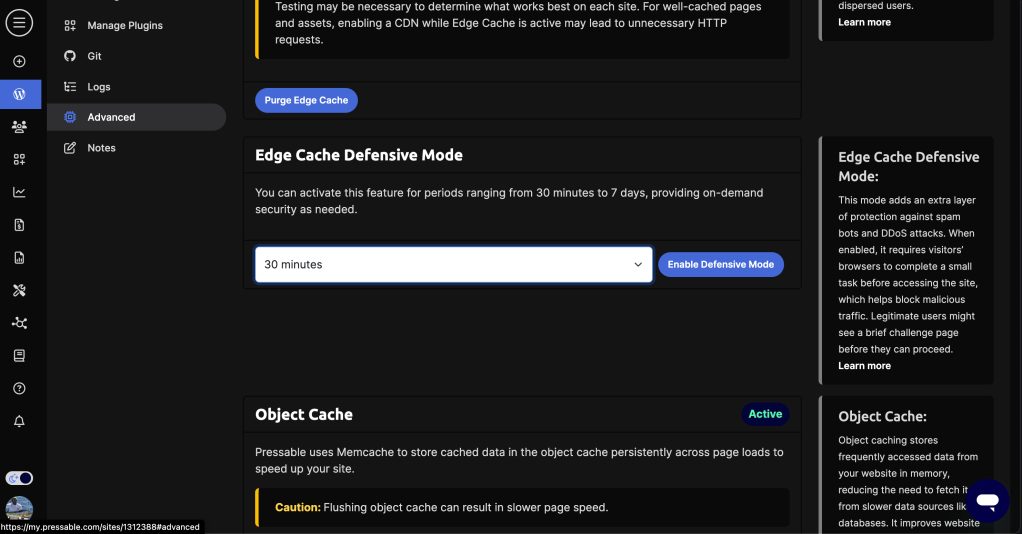
Introducing: Edge Cache Defensive Mode

In our effort to continually raise the bar where it regards your site’s performance and security, we’re thrilled to share we’ve added a new feature that will protect your site if it ever comes under a DDoS attack.

While Pressable’s platform provides DDoS protection, Edge Cache’s Defensive mode offers an additional on-demand layer of protection.

Utilizing proof-of-work, Defensive Mode issues a challenge to browsers visiting the site, mitigating spam bot and DDoS attack requests. Legitimate users will briefly see a challenge page while their browser completes the work before accessing the site.

You can now can activate Defensive Mode within your MyPressable control panel in just a few clicks. This feature can be enabled for durations ranging from 30 minutes to 7 days.

Once it’s activated, you can let it run for the period you select, or you can deactivate Defensive Mode before the automatic deactivation time.

While we hope you never have a need for this, we also hope it provides peace of mind to know you have an extra layer of protection for your mission critical sites.

Thanks for choosing Pressable!

Introducing: Easier Migrations and a Domain Setup Wizard

We’ve recently released some improvements to our migration process, making it easier than ever to move your WordPress sites to Pressable!

When you’re ready to move an existing site over to your Pressable account, you’ll still start by adding a site inside your MyPressable Control Panel. However, you can choose the “Create as a migration placeholder” option when setting up the installation.

This will kick off a smart workflow that automatically creates tailored migration instructions for your specific site.

You can read more about the migration steps that follow here.

Of course, the intelligent updates don’t stop there… We’ve heard you share that DNS updates can be tricky, especially when you’re helping on a client-owned domain.

This is why we’ve introduced our new Domain Setup Wizard, which allows you to connect your domain to your Pressable site by automatically detecting the DNS provider and adding the records needed. Simply enter your domain name and the wizard will take care of the rest!

With this workflow, you can make easy work of updating domains where you may not have registrar access. Simply select the “forward login to someone else” option and they can securely log in on their end without needing to do anything else — the wizard will take care of the rest!

More information on the Domain Setup Wizard can be found here.

As always, our team is also available to assist with migrations if you’d rather not handle things yourself. Simply open a new chat and let us know.

Press on!

Introducing: Enhanced Data Sync

If you make the effort to test your website’s changes in a staging environment, it makes sense to want an easy way to sync them with your production environment.

We’re excited to share that we have introduced additional options built-in syncing tool that lets you further fine-tune what you sync and where. You can read more about how to use this enhanced method here.

These new options include:

  • Theme Files and Directories Sync: Synchronize theme-related files and folders.
  • Plugin Files and Directories Sync: Synchronize plugin-related files and folders.
  • Media Uploads Directory Sync: This synchronizes the media uploads directory. (Please note that syncing the entire database is necessary for files to display correctly in the Media Library.)
  • WP-Content Files and Directories Sync: Synchronize files and directories within the wp-content folder, excluding themes, plugins, or uploads.
  • Web Root Files and Directories Sync: Synchronize files and directories located in the root directory, excluding the wp-content folder.
  • Database Sync: This process will entirely overwrite the database on the destination site.

If you want to get even more technical, you can choose the Environment Type for your destination site, selecting from local, development, staging, production, or default.

These options are also available for use through our API – you can read documentation about this here.

We hope you find this helpful for your workflows!

Introducing: The Pressable Update Calendar

It’s hard to keep up with the never-ending (but absolutely awesome) progress within the WordPress community, and remembering when various releases are coming can be a challenge.

This is why we’ve created the Pressable Update Calendar, giving you a clear view of upcoming updates and deprecations on the Pressable Platform, including key WordPress and PHP events.

You can access this inside your MyPressable Control Panel within the News Center, next to where you’re reading this message right now. Easy reminders for the win!

Introducing: Bulk Operations

If you manage multiple websites and have wanted to complete a single action across multiple sites at once, this release is for you!

If you have more than one site on your account, you will now see a new “Tools” section in the left hand menu inside your MyPressable Control Panel. You will find the Bulk Operations feature inside.

As of today, you are able to update PHP versions, WordPress versions, or run custom Bash commands across a series of sites on your account. Learn more about how you can use this time-saving tool here.

Introducing: Easy Site Transfers

If you build sites for other people but want them to have their own hosting account, this new feature is for you!

Rather than go through the whole process of migrating their site yourself, whether it’s live or not, you can simply transfer it to their account.

Screenshot showing the transfer site option within the MyPressable control panel

During a site transfer, no changes are made to the site instance itself. All posts, pages, users, and other existing content and elements before the transfer will remain the same after the transfer is completed. All original collaborators attached to the site are also kept in place.

Learn more about this powerful tool here

Introducing: Maintenance Mode

In October, we released the ability to put your sites into maintenance mode through our API. Last month, we made it as easy as clicking a button inside your MyPressable control panel to enable it — no plugins or third-party tools needed!

Change your sites to maintenance mode through the Pressable API.

This feature is available on all Pressable hosting plans and can be used on both production and staging sites. Click here to learn more.

Introducing: Performance Report Badges

We know that time is money and there never seems to be enough of it. That’s why we wanted to make it easy to see the performance of each of your sites at a glance – no need to dig for the details to get a high level trend check!

Inside your MyPressable control panel’s site listing, you can now see the most recent two performance report scores for each of your sites, along with an indication of whether your site’s performance is improving, staying the same, or degrading. This is further detailed to show the desktop versus mobile scores for each.

Screenshot of the Pressable performance report scores inside the customer control panel

Click here to learn more about what these scores mean and how you can put them to work for you.

Introducing: White Label Performance Reports

If you host sites for your clients, you might want to send them beautiful updates that details the recent performance of their site.

To help you make these look even more professional and complete, we’ve created a way to add your company logo to your account, which will automatically white label all of your reports for you without the need to individually customize them. Pretty sweet, right?!

Screenshot from the Pressable control panel that shows where customers can upload their company logos for white labeled reports

Learn how you can put this into place for your reports today.

Introducing: Git Integration Enhancements

If you take advantage of our easy GitHub integration, this one’s for you!

Last month, we released a new set of toggles that give you the flexibility to synchronize your plugins and/or themes directories. Additionally, you can decide whether to delete theme files and/or plugin files that are not present in the repository. Learn more about this here.

Simple yet powerful! We hope this makes things even easier for you.

Screenshot of the GitHub Integration Settings inside the Pressable control panel

Introducing: Enhanced Plugin Management

A couple of months ago, we quietly launched a Plugin Management feature that makes it easy to schedule updates for the plugins you want, when you want, while leaving others as prescribed. Now that we’ve been able to incorporate feedback from our early adopters, we’re thrilled to announce the release to everyone!

This new tool makes it easy to manage your site’s plugins directly from your My Pressable Control Panel (MPCP) without having to access the WordPress Admin backend. You can learn more about it here, but this the short version of its awesome story:

  1. You can set up to two plugin update schedules, choosing which plugins you’d like the tool to update and when you’d like it to do so.
  2. Before making any changes, we’ll run a site performance report. This will later give you a “before and after” to see if any of the plugin updates impacted your site’s performance.
  3. A snapshot is made of your site and cloned to a staging environment where the update is performed. This lets the tool detect any potential update issues in an isolated environment – never on your live production site.
  4. After the update is performed in an isolated staging environment, the tool runs additional health and performance tests on your site. Once everything is determined to be working as expected, we’ll include notes about it in your plugin management reports.

Easy as can be, right?

Since this functionality requires additional processing and reporting resources, Pressable’s Plugin Management feature is a paid upgrade that can be purchased on a per-site basis for just $3/mo or $30/yr with annual billing.

You can learn more about how to purchase this and how to get started in our knowledge base article here.

We hope you find this helpful, and as always, we thank you for choosing Pressable!

Coming Soon: New MyPressable Dashboard Experience

We have heard your feedback and are excited to share the news that a beautiful update is coming to your MyPressable dashboard! You can expect to see it on Monday, November 13, 2023.

Equal parts aesthetic and function, the enhancements will provide a more modern, intuitive experience while still packing a powerful punch. Here’s a sneak preview of your new welcome page:

You’ll note that the menu items currently in your top navigation menu will be moved to the left. The Knowledge Base and News Center will move to the upper left menu, while your Settings, Activity, and other menu options will move to the lower left by your name:

You’ll see even more navigational improvements on your new Site Details pages. Once again, your horizontal menu items will move to the left, making it easier to see and access the available tools and features. Here’s an example of how that page will look when the update is released:

And of course, if you’re a dark mode lover like many of us are, we have you covered in the new design. Here’s a preview of what that will look like should you choose to enable it:

These are just a few examples of the improvements you can expect to see soon in your MyPressable Dashboard.

Prior to launch, we will publish a full inventory of the changes in case you need a little help finding things or just want to see what was updated. We’ll be sure to post a link to it here in your News Center when it’s available.

Until then, we thank you for choosing Pressable and look forward to sharing the new experience with you soon!

Introducing: Pressable Activity Logs

We are excited to share that you can now track various actions taken on your Pressable account and sites within the My.Pressable.com Dashboard.

These logs are categorized into two sections: Site Activity Logs and Account Activity Logs.

As the names suggest, one provides details of the activities and events taken on your Pressable site(s) and the other provides you with a window into the diverse interactions occurring within your My.Pressable.com Dashboard.

These features are accessible today through your My.Pressable.com Dashboard and the Pressable API.

More information about activity logs and screenshots of them are available here.

We hope you find these helpful!

Default Datacenter Selection for New Sites

In your MyPressable Control Panel you can now select a default datacenter for all new sites 

here: https://my.pressable.com/settings/sites

Then select the data center location you’d like to use in the Default Datacenter section as shown below:

Select the Default Datacenter in the Pressable dashboard.

The Pressable API documentation includes the default data center option setting for the account.

The currently selected value also includes the GET response for an account, displaying the account’s current default data center setting.

Introducing: Edge Cache

Pressable is thrilled to announce Edge Cache across all plans, a free performance feature that allows your WordPress site to leverage our global network of edge servers to deliver page and static asset cache.

Edge Cache provides performance improvements, particularly to the Time to First Byte (TTFB), by serving page cache directly from the closest server available to a site’s visitors. This cache is served from Pressable’s four origin datacenters, and over 24 edge datacenters, giving sites a total of 28 Point of Presence (PoP) locations that are continuously expanding.

Edge Caching is being released in beta; however, has been tested extensively, including on some of our largest sites, high-traffic sites.

You can read more about Edge Caching and how to enable it for your site here.

Introducing: On-Demand Backups

In your MyPressable Control Panel, you can create on-demand backups under your site’s Backups | Restores tab. 

In this section, you will see the ability to create a file system backup or a database backup. You are limited to three backups at any point in time. 

On-demand backups are automatically deleted after thirty (30) days for the latest backup taken and seven (7) days for the oldest backups. 

You can restore your on-demand backups from the same screen.

The on-demand backups are separate from the automated backups we maintain for your site and will not affect the daily backups we automatically create.

Additional detail can be seen in our knowledge base article here.

We hope you find these helpful!

Introducing: Advanced Site Details

In your MyPressable Control Panel, you now have a new tab in your Site Details menu.

In this new section, you can find:

  • Light Weight 404
    With this simple toggle, you can improve your site’s performance by allowing Nginx to handle static file requests directly, without passing them through WordPress. This can help reduce the load on your server and improve the overall speed and responsiveness of your site.
  • Jetpack Settings
    Easily locate details about your Jetpack license, options table values, your license key, the date it was issued, and a button to reset the license. Learn more about setting your license here.
  • Cron Events
    This section will allow you to quickly review all current cron events found on your site and see how often they run. Learn more about how to manage your cron jobs here.

We hope this helps you more efficiently and effectively manage your sites!

New Webhooks Added

We know a robust API is important for many of our customers. As such, we have been adding even more webhooks to help you subscribe to events that matter most to you.

As new webhooks are added, we will update our API documentation with details.

Please continue checking back to see more as they’re released, and if you have a specific webhook you’d like to see, please let us know!

Your feedback is important to us and we would love to include your request in a future release.

New Feature: SSL Certificate Reset

There may be times when you build your site on Pressable but don’t assign a live domain to it right away. When this happens, you may find that your site doesn’t have an SSL certificate and you will need to re-provision one.

With this new feature, you can do that from the Domains tab in your control panel with just one click.

To re-provision your SSL certificate, simply click the reset icon to the right of your domain.

If you already have a valid SSL certificate, you may see an error message, but if your site does not yet have a valid certificate this should generate one. You only need to click the icon once, we will include all secondary domains attached to the site in the certificate.

If you are still having trouble with SSL not working as expected please contact our support team for further assistance.

We hope this new feature makes managing your sites even easier. Thanks for choosing Pressable!

Introducing: Pressable’s Refer-A-Friend Program

You already use Pressable and know how great it is.

What if you could get your hosting for free (or deeply discounted) while helping your friends save money?

Simply share your ready-to-go code when telling others about us and when someone uses it to buy a new plan with us, you will receive $50 in account credits.

Even cooler, the friend you refer will receive up to $25 off their first month.

Want to learn more? Click here and share away!

Introducing: Cross-Site Restores and Improved Site Environment Access

We are honored to be your WordPress hosting provider and we’re committed to providing you with the best possible experience. We are constantly working to improve our platform and are excited to announce two new features this month that we believe will make it even better to work with Pressable. They are: 

  • Easier Live and Staging Site Access. We’ve added some quick access tabs inside your MyPressable dashboard, making it faster and easier than ever before to navigate from child sites (clones/staging) to your parent site (production), and vice versa. From this area, you can also quickly create new staging sites or clones of your existing production site. Simply visit one of your MyPressable Site pages and give it a try!  

    Pressable Site Details
  • Cross-Site Restores. Pressable’s new cross-site restore functionality allows you to restore a backup from one site to another site in your account. This is a useful feature if you need to restore a site to a previous point in time, or if you need to move a site to a new server. Click here to learn how you can put these to work for you.

We hope you like them! And as always, if you have any questions or feedback, or even if you have an idea for a feature that you’d like to see us build, please know we’re always just a quick chat away! Thanks for choosing Pressable!